Why a Battery Backup System Installation is Essential for Your Peace of Mind
Planning a battery backup system installation is one of the smartest ways to protect your home or business from sudden blackouts, especially with the increasingly unpredictable weather we are experiencing in July 2026. When the grid fails, a reliable battery keeps your lights on, your internet running, and your sump pump active—all without the noise, fuel, or fumes of a traditional generator.
If you are looking for a quick overview of what a typical installation looks like, here are the key facts you need to know to get started:
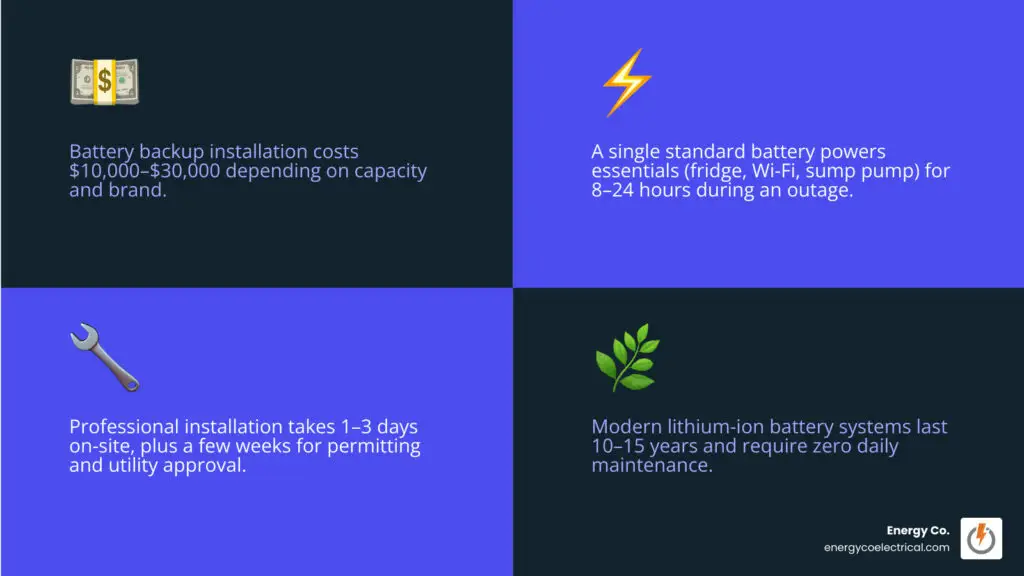
- Average Cost: $10,000 to $30,000 including professional labor (depending on battery capacity and brand).
- Tax Incentives: You can claim a 30% federal tax credit under the Inflation Reduction Act to offset the total installation cost.
- Backup Duration: A single standard battery typically powers essential loads (fridge, Wi-Fi, select outlets) for 8 to 24 hours. Pairing it with solar panels can extend this indefinitely.
- Installation Timeline: Expect 1 to 3 days of active on-site electrical work, though local permitting and utility approval can take a few weeks of planning beforehand.
- Lifespan: Modern lithium-ion systems last 10 to 15 years and require virtually zero daily maintenance.
I’m Michał Napieralski, a licensed electrician in Schaumburg, IL, and the founder of Energy Co., where we specialize in heavy-duty panel upgrades and professional battery backup system installation. Over the past decade, my team and I have helped hundreds of Chicagoland homeowners secure clean, reliable backup power to keep their families safe during extreme midwestern weather.
Let’s explore how these systems work and how to choose the right setup for your property.
What is a Standalone Battery Backup and How Does It Work?
At its core, a standalone home battery storage system is a quiet, emission-free reservoir of electricity. Unlike emergency generators that burn fossil fuels to generate electricity on demand, a battery backup system stores electricity that already exists. It sits quietly connected to your home’s main electrical panel, waiting to discharge its stored power the millisecond the utility grid fails.
During normal operation, the battery system draws power directly from the utility grid to charge itself. This is known as grid charging. However, these systems do not just sit idle until a blackout occurs. Thanks to smart energy management software, they can actively help you lower your energy bills through a process called load shifting.
If your local utility provider (such as ComEd in Northern Illinois) utilizes Time-of-Use (TOU) rate structures or hourly pricing, electricity costs significantly more during peak hours (usually late afternoon and early evening) than it does during off-peak hours (late at night or early morning). A smart standalone battery charges itself when grid electricity is cheapest and discharges to power your home when utility rates spike. This automated load shifting reduces your reliance on high-cost grid power without requiring you to change your daily electricity habits.
Integrating a battery system into your home’s electrical infrastructure is also an excellent way to prepare for future electrical upgrades. For a deeper look at preparing your electrical system for modern demands, check out our Future-Proofing Your Chicagoland Home: The Ultimate Summer 2026 Electrical Prep Guide.
Standalone Battery vs. Solar-Paired Systems
When exploring a battery backup system installation, you will quickly notice two main configurations: standalone battery systems and solar-paired systems.
A standalone battery system is connected strictly to the utility grid. It relies entirely on grid-tied charging to replenish its capacity. The primary advantages of a standalone system are lower upfront hardware costs and a simpler installation process, as you do not need to purchase or mount solar panels. However, a standalone battery has a finite limit during an outage. Once the stored energy is depleted, the battery cannot recharge until grid power is restored.
A solar-paired battery system integrates solar panels with battery storage. During a power outage, standard grid-tied solar systems automatically shut down to protect utility workers from electrical backfeeding. However, when paired with a battery and a smart gateway, the system can isolate itself from the grid (islanding) and allow your solar panels to continue generating power. This creates true off-grid capability, where your solar panels power your home and recharge your battery during the day, and the battery supports your home at night.
While pairing a battery with solar provides the ultimate level of energy independence and long-term financial value, a standalone battery remains an incredibly reliable, cost-effective, and practical solution for homeowners who primarily want emergency blackout protection.
Key Components of a Battery Backup System Installation
A modern battery backup system is not just a single battery box; it is an ecosystem of advanced electrical engineering components working in harmony. The main components include:
- The Battery Chemistry (Cells): Modern residential batteries utilize advanced lithium-ion chemistry. The industry standard has shifted rapidly toward Lithium Iron Phosphate (LiFePO4) over Nickel Manganese Cobalt (NMC). LiFePO4 batteries offer superior thermal stability, are highly resistant to thermal runaway (fire hazards), and deliver a significantly longer cycle life (often lasting 6,000 to 10,000 charge-discharge cycles).
- The Battery Inverter: Batteries store electricity as Direct Current (DC), but your home runs on Alternating Current (AC). The inverter is the brain that converts DC power from the battery into usable AC power for your appliances, and vice versa when charging.
- The Smart Gateway / System Controller: This device acts as the traffic cop for your home’s power. It constantly monitors the connection to the utility grid. The instant it detects an outage, it isolates your home from the grid in 10 to 30 milliseconds and commands the battery to begin discharging power.
For a look at how these components integrate in premium systems, you can review the technical layout in the Powerwall 3 Installation Manual with Backup Gateway 2.
Battery Backup System Installation: Sizing and Component Planning
Sizing a battery backup system is the most critical step of the planning phase. If you undersize the system, your battery will drain in a matter of hours or fail to start your appliances entirely. If you oversize it, you will pay thousands of dollars for capacity you do not need.
When sizing a system, we look at two distinct metrics:
- Usable Capacity (measured in kilowatt-hours – kWh): This is the total amount of electricity stored in the battery that you can safely use. Think of it as the size of your electrical “fuel tank.”
- Power Output (measured in kilowatts – kW): This is the amount of electricity the battery can deliver at any single moment. We evaluate both continuous power (how much power the battery can deliver indefinitely) and peak/surge power (the brief, high-power output required to start heavy motorized appliances, often measured as locked rotor amps or LRA).
To help put these requirements into perspective, look at this comparison of typical household power demands:
| Appliance / Load Type | Average Running Wattage (Continuous Power) | Estimated Starting Wattage (Peak Power / Surge) | Sizing Priority |
|---|---|---|---|
| Sump Pump (1/3 HP) | 800 W | 1,500 W – 2,500 W | Critical (Prevents Flooding) |
| Refrigerator / Freezer | 700 W – 1,200 W | 1,200 W – 2,200 W | Critical (Prevents Food Spoilage) |
| Wi-Fi Router & Modem | 20 W – 50 W | 20 W – 50 W | Essential (Communication) |
| LED Lighting (10 Bulbs) | 100 W | 100 W | Essential (Safety) |
| Central AC (3-Ton) | 3,000 W – 4,500 W | 8,000 W – 12,000 W | High-Draw (Requires Multi-Battery) |
| Electric Water Heater | 4,500 W | 4,500 W | High-Draw (Usually Excluded) |
Determining Your Capacity and Power Output Needs
To determine how many kilowatt-hours of capacity you need, you must identify which loads are essential and how long you need to run them. The average American household consumes approximately 900 kWh of electricity per month, which breaks down to about 30 kWh per day.
If you wanted to power your entire home exactly as you do when the grid is active, you would need a massive battery system with 30 kWh or more of storage. However, during an outage, most homeowners focus on backing up essential loads.
To calculate your exact capacity requirement, multiply the running wattage of your critical appliances by the number of hours you need them to run. For example, running a refrigerator (800W), a sump pump (800W cycling 25% of the time = 200W average), and 100W of lights/chargers equals a continuous draw of 1.1 kW. If you want this setup to run for 12 hours during an overnight outage:
Because lithium batteries should not be drained completely to preserve their health (governed by their usable depth of discharge, which is typically 80% to 90%), a standard 13.5 kWh battery (like a Tesla Powerwall 3 or Franklin aPower) would be the perfect fit for this scenario.
If you are planning spring or summer home upgrades in the Northwest Suburbs, you can learn more about electrical planning in The Ultimate 2026 Guide to Spring Electrical Maintenance and Upgrades for Schaumburg Homeowners.
Critical Loads vs. Whole-Home Backup
During a battery backup system installation, you must decide between a critical loads backup and a whole-home backup configuration:
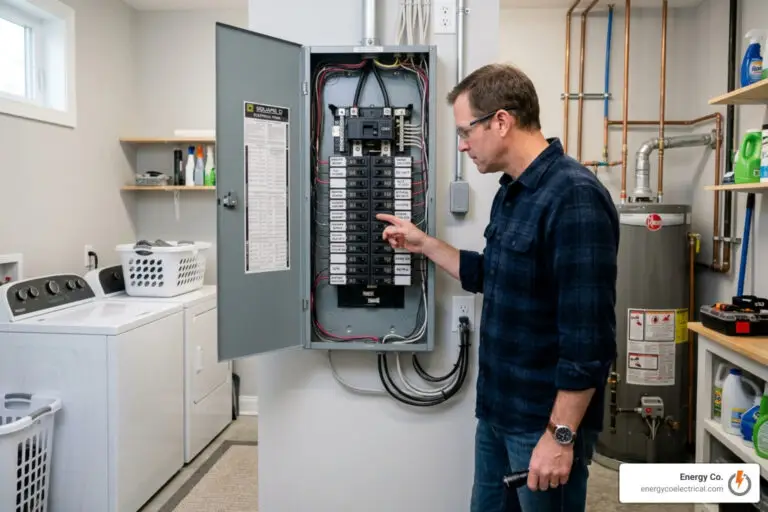
- Critical Loads Backup (Partial-Home): This is the most common and cost-effective approach. Your electrician installs a dedicated subpanel (often called a critical load panel) next to your main breaker box. We physically relocate the electrical circuits for your refrigerator, sump pump, internet router, furnace blower, and select lighting outlets into this subpanel. During an outage, the battery powers only this subpanel, maximizing your battery runtime.
- Whole-Home Backup: In this configuration, the battery gateway is installed directly between your utility meter and your main electrical panel. This allows the battery to send power to any circuit in your home. However, to safely run high-draw appliances like central HVAC systems, electric dryers, or EV chargers, you will need multiple battery units stacked together to handle the massive starting wattage (surge current).
If your power goes out and you need immediate help with your electrical system, our team is always ready to assist with Emergency Electrical Services.
Step-by-Step Battery Backup System Installation Process
A professional battery backup system installation is a highly structured process that requires expert electrical knowledge, strict adherence to local building codes, and coordination with your utility provider.
Here is what the typical step-by-step installation process looks like when you work with our licensed team:
- Site Assessment and Sizing: We inspect your existing electrical panel, measure your home’s load requirements, and determine the optimal physical location for the battery and gateway.
- Permitting and Interconnection: We submit detailed electrical schematics to your local building department (such as Cook County or the City of Chicago) and file interconnection paperwork with your utility provider (ComEd).
- Mounting the Equipment: We securely anchor the heavy battery modules (which can weigh 250 to 300 lbs) to your wall or floor using heavy-duty brackets.
- Wiring the Smart Gateway and Subpanel: We mount the system controller and, if doing a partial-home backup, install the critical loads subpanel.
- Running Conduit and Making Connections: We run heavy-gauge electrical wiring inside protective metal conduit to link the battery, inverter, gateway, and electrical panels.
- Commissioning and Testing: We power on the system, connect it to your home Wi-Fi for firmware updates, and perform a simulated grid outage test to ensure the transition to battery power is seamless.
For an in-depth look at professional installation specifications, you can refer to the FranklinWH System Installation Guide (aGate 1.3 & aGate 1.3.1 & aPower 1.3).
Preparing the Installation Site and Meeting Clearances
Battery backup systems are highly sophisticated electrical appliances that are sensitive to their physical environment. Proper site selection is essential to ensure safety, maintain system efficiency, and protect your manufacturer warranty.
National electrical and fire safety codes (such as NFPA 855 and UL9540A) dictate strict physical clearance requirements for residential battery installations. Generally, you must maintain at least 36 inches of clear space in front of the battery and gateway, and at least 4 to 10 inches of clearance from adjacent walls or other battery units to allow for proper natural convection cooling.
Temperature management is another critical factor, especially during our freezing Chicagoland winters and hot, humid summers. Most modern lithium batteries have an operating temperature range of -4°F to 122°F (-20°C to 50°C). However, extreme cold significantly reduces battery charging efficiency and can trigger internal heaters to run, which drains your stored energy.
For this reason, we highly recommend installing battery systems in temperature-controlled environments, such as a basement or a garage. If a battery must be installed outdoors, it should be kept out of direct sunlight (avoiding south-facing walls) and protected by a shade structure. Furthermore, installing batteries in habitable rooms like bedrooms is strictly prohibited by building codes due to safety hazards.
To learn more about safety clearances and physical installation specifications, refer to the Home Battery 48V Installation Guide.
Electrical Integration and Smart Panel Setup
Integrating the battery into your home’s electrical panel requires precision. Unlike older backup systems that used manual transfer switches, modern installations utilize smart electrical panels or automated system controllers.
These smart panels act as intelligent gateways. They allow you to monitor your energy consumption in real-time through a mobile app, toggle individual home circuits on or off during an outage to conserve power, and track how much energy your battery is storing.
When we perform an installation in the Chicago area, we must adhere to the Chicago Electrical Code, which is famously strict. For instance, while other parts of the country permit the use of flexible Romex wiring inside walls, Chicago codes require all electrical conductors to be run through rigid metal conduit (EMT) to prevent physical damage and fire hazards.
Essential Tools and Materials for Battery Installation
- Heavy-duty hammer drill and masonry anchors (for mounting to concrete or brick walls)
- EMT conduit, benders, and watertight fittings
- Heavy-gauge copper conductors (sized appropriately for the system’s continuous output)
- Digital multimeter and insulation resistance tester (Megger)
- Personal Protective Equipment (PPE) including safety glasses, insulated gloves, and steel-toed boots
- Manufacturer-specific commissioning software or installer mobile application
If you are interested in transforming your home into a fully connected, energy-efficient space, you can read about our Smart Home Integration services.
Comparing Standalone Batteries to Generators and Portable Stations
When homeowners begin looking for emergency backup power, they typically compare standalone batteries to two other popular options: traditional standby generators and portable power stations.
To help you make the best decision for your home, let’s look at how these three options stack up against each other.
Standalone Battery vs. Standby Generator
Traditional standby generators (which run on natural gas, propane, or diesel) have long been the default choice for emergency backup power. However, standalone batteries have quickly become the preferred modern alternative for several key reasons:
- Instant Switchover: A standby generator takes anywhere from 10 to 30 seconds to start up and transfer power after a blackout begins, causing your digital clocks to reset, your computer to shut down, and your sump pump to temporarily lose power. A battery backup system switches over in less than 30 milliseconds—so fast you won’t even notice the power went out.
- Fuel Independence: Standby generators require a continuous supply of fuel. During major storms, natural gas lines can be shut down for safety, and local gas stations may lose power, making diesel or propane difficult to obtain. A battery charges quietly from the grid (or solar) and requires no fuel storage.
- Zero Noise and Emissions: Generators are loud, often producing 60 to 80 decibels of noise (similar to a lawnmower) right outside your window, and they emit exhaust fumes. Batteries are completely silent and produce zero emissions, making them safe for indoor installation.
- Maintenance: Generators have internal combustion engines that require regular oil changes, spark plug replacements, and annual professional tuning to ensure they start when needed. Batteries have no moving parts and require virtually zero daily maintenance.
For a detailed breakdown of generator setup and costs, you can explore The Definitive Guide to Standby Generator Installation Costs.
Standalone Battery vs. Portable Power Station
Portable power stations (often marketed as “solar generators”) are essentially large, wheelable battery packs with built-in outlets. While they are great for camping trips or tailgating, they are not a substitute for a permanently installed home battery backup:
- Hardwired Integration: A standalone home battery is hardwired directly into your main electrical panel. You don’t have to run extension cords across your living room floor to power your refrigerator or sump pump. Everything happens automatically behind the scenes.
- Power and Capacity Limits: Portable power stations typically max out around 2 to 3 kWh of capacity and have limited surge power. They cannot safely power hardwired 240V household appliances like central air conditioners, electric water heaters, or heavy-duty sump pumps.
- Safety and Code Compliance: A hardwired home battery system is fully code-compliant, professionally grounded, and equipped with built-in rapid shutdown and arc-fault protection features to keep your home safe.
If you are considering a standby generator instead, you can learn about safe installation practices in our guide on How to Safely Install a Backup Generator for Your Home.
Frequently Asked Questions About Battery Backup System Installation
How much does a battery backup system installation cost?
The total cost of a battery backup system installation typically ranges from $10,000 to $30,000. This wide range is due to several variables, including the battery capacity (kWh), the brand of equipment selected, the complexity of your home’s electrical panel, and whether you require a critical loads subpanel or a whole-home smart panel.
Fortunately, the financial burden is significantly reduced by the Federal Residential Clean Energy Credit. Under the Inflation Reduction Act, homeowners can claim a 30% tax credit on the total cost of installing a home battery backup system (including equipment and professional labor) for systems with a capacity of 3 kWh or greater.
How long will a home battery backup power my home during an outage?
During a typical power outage, a single home battery system can power your critical loads for 8 to 24 hours, depending on how actively you manage your energy consumption.
For example, a standard 13.5 kWh battery supporting a continuous essential load of 1.5 kW (which easily covers a refrigerator, sump pump, home router, and basic lighting) will provide about 9 hours of continuous power. If you turn off non-essential lights, avoid using high-draw appliances like the microwave or toaster, and only run your sump pump when necessary, you can easily stretch that backup time to 24 hours or longer.
What maintenance is required for a home battery backup system?
One of the greatest benefits of modern lithium-ion and LiFePO4 battery systems is that they are virtually maintenance-free. Unlike gas generators, there are no engines to service, no oil to change, and no fuel filters to replace.
However, we recommend performing a few basic checks to ensure maximum efficiency:
- Visual Inspections: Periodically check the exterior of the battery casing for any signs of physical damage, wear, or loose conduit connections.
- Keep it Clean: Gently wipe away any dust, dirt, or spiderwebs from the battery vents with a soft, dry cloth. Blocked vents can restrict airflow and cause the battery to run hot, reducing its lifespan.
- Temperature Control: Ensure that the space surrounding the battery remains clear of stored items to allow for proper natural convection cooling.
- Annual Professional Checks: We recommend having a licensed electrician inspect your system once a year to test the battery’s state of charge, check wire connections, and verify that the automatic transfer switch operates correctly.
Conclusion
Investing in a battery backup system installation is one of the most effective ways to secure clean, silent, and reliable emergency power for your home. Whether you want to protect your basement from flooding during a severe summer storm or keep your lights and internet running during an unexpected winter blackout, a standalone battery provides unmatched peace of mind.
At Energy Co., we take pride in offering expert electrical services tailored to the unique needs of Chicagoland homeowners. From older historic homes in Chicago to modern properties in Schaumburg, Arlington Heights, and Mount Prospect, our licensed, professional electricians are committed to delivering top-tier craftsmanship and a satisfaction guarantee.
Are you ready to take control of your home’s energy resilience? Contact us today to schedule a professional site assessment, or explore our full range of Residential Electrical Services to get started.